Soundtrack Maker
Music tracks that match the mood are automatically generated by Soundtrack Maker. Open Soundtrack Maker via "Edit" > "Wizards".
Select music style

First choose the music style. The option "Apply only between start and end marker" lets you limit the length of the background music you want to create. You can also set the Start and End markers with the left and right mouse button if the Soundtrack Maker is open.
Set mood change
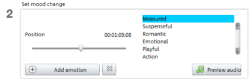
You can select a mood from the list.
Preview: Here you can preview your selected emotion.
Position: With the position slider you can go to a certain position to set the emotions at a certain position. Instead you can also move the start marker with the left mouse button. The preview will be displayed in the video monitor.
Add emotion: This button inserts the selected mood at the current position. MAGIX Soundtrack Maker will then suggest a new position for the next emotion by repositioning the position slider. You can also position it elsewhere and add different moods.
Delete emotion: Removes the currently set emotion.
Generate background music

Clicking "Create soundtrack" creates a new soundtrack.
"Progress" shows the current status.
Variations
If the background music that has been created is not suitable, a variation may be created.
You can do this for the entire background music as well as for individual emotions.
-
If you want to vary the entire background music, then click on "Create variations".
-
If you only want this to apply to a certain emotion, then you should first go to it with the position slider in the dialog (or the start marker on the main screen). Then activate the option "Vary only selected emotions". Now click on "Create variations".