Star Wipe
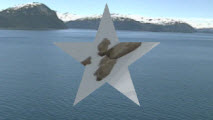
|
Item |
Description |
|---|---|
|
Arms |
Drag the slider or type a value in the edit box to specify the number of arms for the star. |
|
Ratio |
Sets the length of the star arms: drag left to increase the arm length, or drag right to decrease arm length. |
|
Angle |
Rotates the star within your video frame. |
|
Feather |
Determines how smoothly the star fades into the background. |
|
Borders |
Sets the width of the star's border |
|
Border Color |
Sets the color of the star's border |
|
Center |
Sets the center of the star within the video frame. |
|
Cycles |
Drag the slider to set the number of concentric stars that will be used to form the transition. |
|
Waveform |
Choose a setting to establish the direction of the transition. |
|
Flip horizontal Flip vertical |
Select these check boxes to mirror the star shape in the video frame. |
|
Flip horizontally Flip vertically |
Select this checkbox to mirror the star shape on the corresponding axis. If you're working with a star shape that is not centered in the frame, you can use mirroring to create multiple star shapes. |
|
direction |
Sets the direction of the transition: choose Forward if you want the star to grow through the transition, or choose Reverse if you want the star to shrink through the transition. |