Spherize
This effect distorts the image as though it were being wrapped around a spherical shape. This gives objects a 3-D appearance.
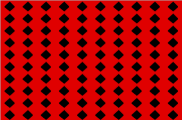
FIGURE Original
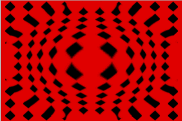
FIGURE Spherize
|
Item |
Description |
|---|---|
|
Center |
Click the arrow Perform one of the following actions to set the center of the effect:
|
|
Ratio |
Determines the amount of deformation. Positive settings produce a convex effect, and negative settings produce a concave effect. |
|
Scaling |
Click the arrow Drag the Horizontal slider to determine the width of the sphere. Drag the Vertical slider to determine the height of the sphere. When the Proportional checkbox is selected, the vertical and horizontal scaling are proportional based on the Horizontal value. When not selected, vertical and horizontal scaling can be set independently. |
 to show or hide the center controls.

Last modified on December 08, 2025