Movie and editing templates
Unlike effects, film and editing templates are not dragged on to the existing material in the project window like effects, but opened just like a standalone film. Each holds a placeholder that can be filled with its own material. For example, you can use it for the opening credits or a film teaser to introduce material on a website or in an email.
The movie templates are located under "Templates" > "Movie templates & editing templates" in the Media Pool. Select the movie template according to the desired length of the movie. Double clicking on a movie template opens it for editing.
Insert your own material
In the lower section, you can see the vertically arranged structure of the template. It is arranged into several scenes. You can find additional explanations in the information window to the right.
You can insert your own content anywhere you see a media placeholder. The specified length will be displayed on the media placeholder. Their lengths cannot be changed.
The placeholder icons indicate which type of material should ideally be inserted here (e.g., group shot, landscape, close up).
-
Drag the desired image or video from the Media Pool in front of the placeholder to be replaced.
If the video inserted is too short, it will be rejected by Movie Studio.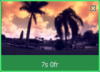
Images automatically become the length of the controlled media placeholder.
-
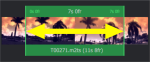
If the video is too long for the media placeholder, move the position of the video in the editing area.
Automatic filling
To add content quickly, use automatic filling.
Select multiple media items in the Media Pool and drag them over the movie template. A field will appear where you collect your media. The movie template will now be automatically filled. The order of the media items in the template determines the date of the files; the sections are selected at random.
NOTE Depending on the template, either the entire template will be filled with the video footage or individual placeholders will each be filled with a video from the selection.
If you do not like the compilation, click on Reapply and the program will select new video sections.
Design title
To customize the text, click on the corresponding placeholder and enter the desired text to the right of the editing area in the text field.
Further use of movie templates
Burning and exporting a filled template works just like with any other project.
Manually editing a movie template
 Click this button if you want to customize the movie template in detail. The movie template will be transferred to the known edit screen and every object, every transition, every music title, etc. can be customized.
IMPORTANT Warning! You cannot return to the movie template wizard.